
We’ve put together an overview of creating a website with WordPress using Kinsta.
What is WordPress?

WordPress is the most widely used website creation and management tool in the world.
Using WordPress, you can easily design a homepage and publish the articles and content you want to provide to users.
What is Kinsta?

Kinsta is a hosting service that optimizes Google Cloud for running WordPress sites.
You can learn more about Kinsta in the following articles:
The most important things you should know about Kinsta – Kinsta
Kinsta is a hosting service from Google’s cloud services that offers the most streamlined solution for running a WordPress site.
What is Google Cloud?

Google Cloud is a cloud service provided by Google.
Benefits of using Kinsta
Kinsta offers premium managed WordPress hosting powered by Google Cloud Platform, focusing on high performance, top-tier security, and expert support. Key benefits include lightning-fast speeds via Edge caching and global data centers, free Cloudflare integration with DDoS protection, automatic daily backups, staging environments, and a dedicated 24/7 support team.
- Edge caching and global data centers,
- free Cloudflare integration with DDoS protection
- automatic daily backups
- staging environments
- dedicated 24/7 support team
Using Kinsta to Run a WordPress-Optimized Environment on Google Cloud
Kinsta is a recommended service for individuals or companies who find it difficult to set up their own WordPress environment on Google Cloud.
While Google Cloud is a powerful cloud platform provided by Google, building an environment optimized for WordPress requires specialized technical knowledge. Kinsta provides a WordPress-optimized environment on Google Cloud without requiring you to have this expertise.
In addition, the Google Cloud environments provided by Kinsta are often higher performing than what an individual or company could set up on their own. Even if you have the technical skills to build your own cloud environment, using Kinsta can still be highly valuable.
Kinsta has fast page load speeds
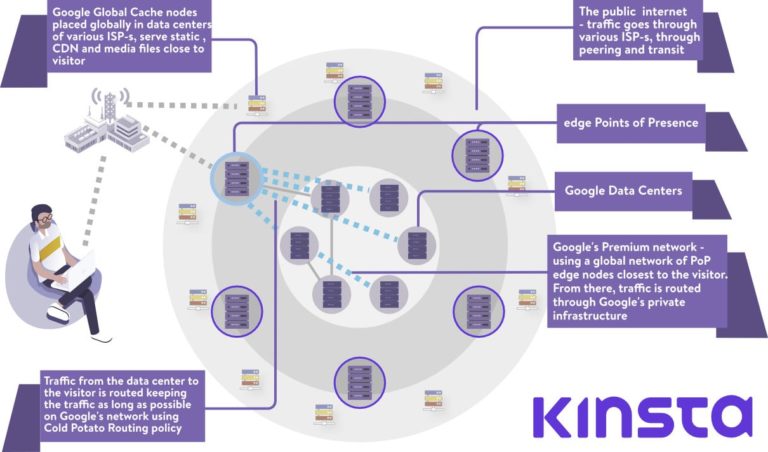
Kinsta’s Hosting Services use Google Cloud’s Premium Tier Network.
This means your WordPress pages load faster than with standard hosting services.
Google Cloud Platform offers two different network tiers which differ both on price and performance.
At Kinsta, we utilize Google Cloud’s Premium Tier Network with all of our hosting plans. This minimizes distance and hops, resulting in faster, more secure global transport of your data.
Google Cloud Platform Network: Premium Tier vs Standard Tier – Kinsta
How to Start WordPress with Kinsta
Here’s how to get started hosting your WordPress site with Kinsta:
- Visit Kinsta website.
- Choose a plan and create a Kinsta account.
- Create a website with WordPress.
Choose Plans on Kinsta website
Once you visit Kinsta, choose a plan.
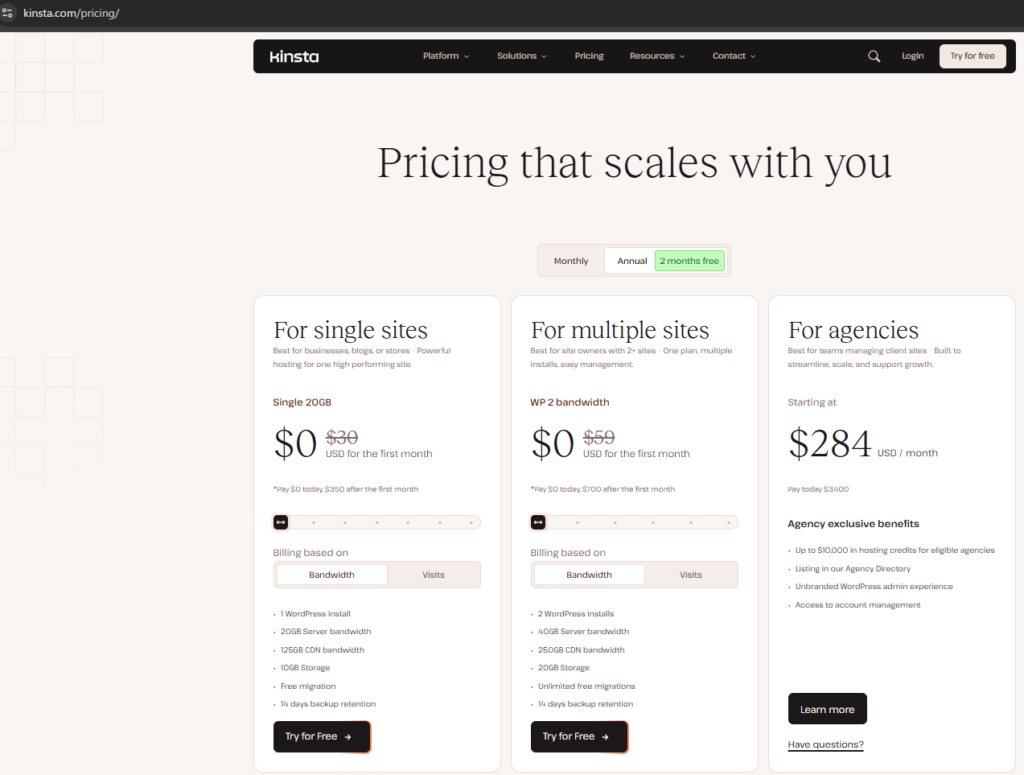
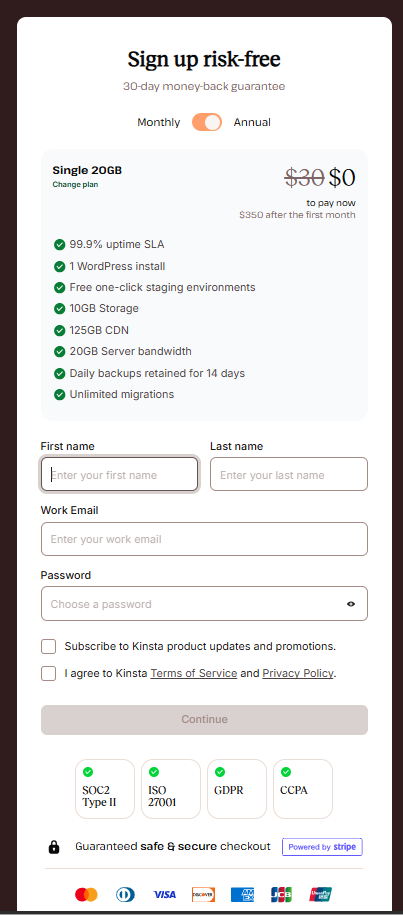
Create Kinsta Account
After choosing a plan, you create an account.
Install WordPress on Kinsta
After creating Kinsta accounts, you install WordPress on your Kinsta accounts.
Recommended Services for WordPress Hosting on the Cloud Compared to Kinsta
Just like Kinsta, there are other services that allow you to set up a WordPress environment on the cloud. Here, we introduce some recommended alternatives.
AWS Lightsail (AWS)
AWS Lightsail is an AWS service that can be used at a low cost with a fixed monthly price.
https://aws.amazon.com/lightsail
Amimoto (AWS)
Amimoto is a service that allows you to set up an environment for running WordPress on AWS.
Conclusion
To set up a WordPress environment on Google Cloud, you need specialized knowledge of Cloud services and Linux, and you must prepare an optimized environment yourself. By using Kinsta, however, you can easily access a high-performance WordPress environment on Google Cloud with a fixed monthly fee.
Kinsta is recommended for those who find it difficult to manage their own Google Cloud setup or who want to use an environment optimized specifically for WordPress.
Related posts:
 Our Experience Moving from Shared Hosting to the Cloud (AWS)
Advantages of Migrating from Hosting Services to Cloud Infrastructure
Our Experience Moving from Shared Hosting to the Cloud (AWS)
Advantages of Migrating from Hosting Services to Cloud Infrastructure
 How to Optimize Your WordPress Site for Search Engines
 How to use Generate Press: Fast Loading WordPress Theme
 Install Google Site Kit into WordPress
 Use cloud services to operate a site created with WordPress
Key Considerations When Migrating from a Hosting Service to the Cloud
Use cloud services to operate a site created with WordPress
Key Considerations When Migrating from a Hosting Service to the Cloud
 Recommended Services for WordPress Users Who Cannot Build Their Own Cloud Environment